Ethiopian Standard · ኢትtech

ET-100
Biometric Attendance
Terminal

A fingerprint attendance machine built for Ethiopian workplaces — paired with a complete PC application for schedule management, automatic salary calculation, and detailed reporting.

100

Max users

<1s

Scan speed

2

Calendars

9

App pages

1yr

Warranty
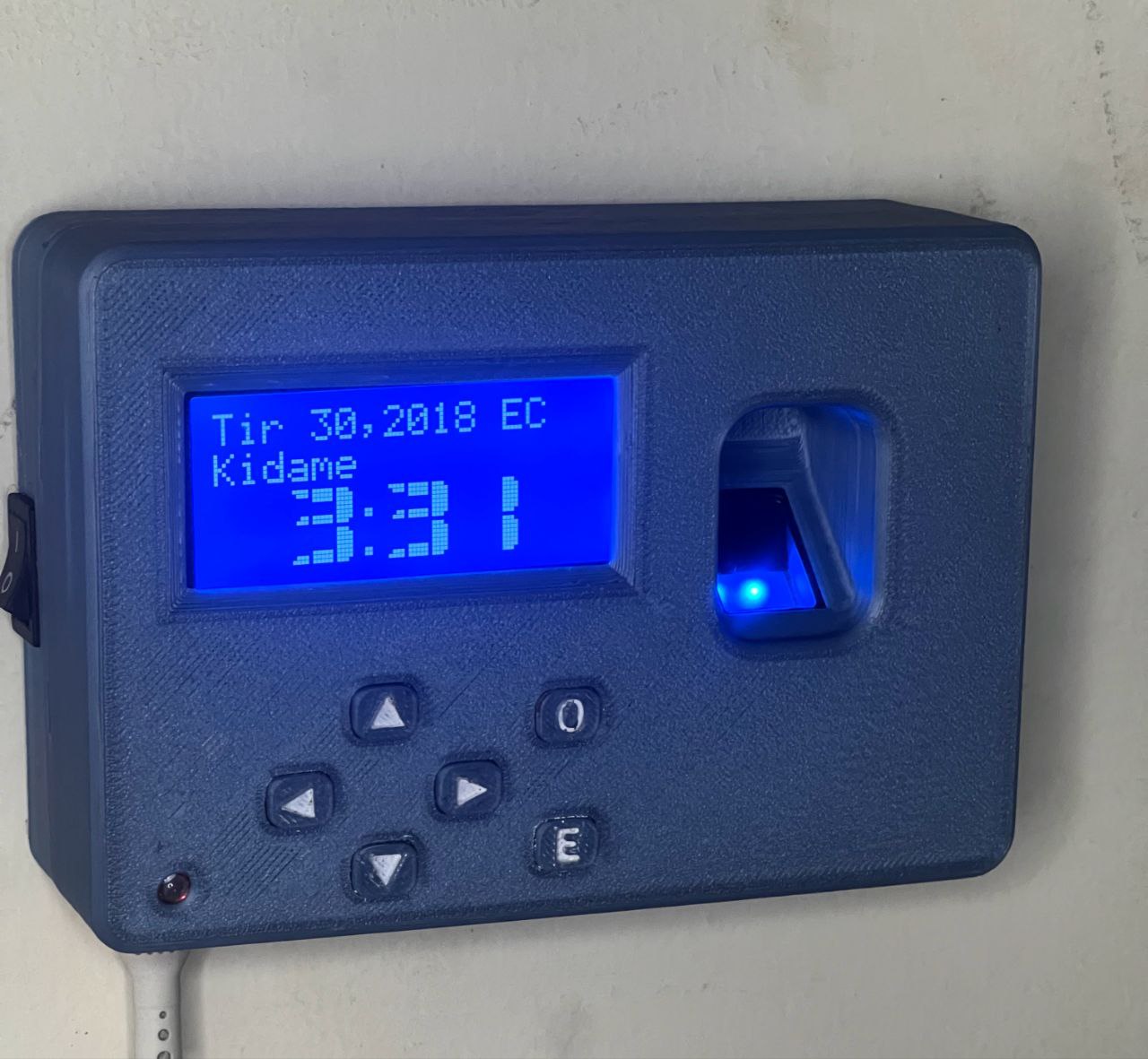
ET-100 Terminal
ET-100 Biometric Terminal

Core Features

Everything the ET-100 system covers — from the physical terminal to every screen of the application.

Machine — ET-100 Terminal
Fingerprint Recognition

Fast, accurate scanning. No cards or PINs required.

100 User Capacity

Up to 100 employee fingerprints stored on-device.

Ethernet + Offline

Connects via Ethernet. Works fully without internet.

Backup Battery

Keeps recording through power cuts. No data lost.

Dual Calendar

Ethiopian and Gregorian calendar support built in.

Safe Data Recovery

Records recoverable even if the machine goes down.

Easy to Use

No technical knowledge needed. Anyone can operate it.

Ethiopian Standard

Meets Ethiopian standard — fits official institutional use.

Application — ETtech Attendance App
Real-Time Tracking

Clock-in, clock-out, break-in, break-out recorded instantly.

Schedule Management

Organize work shifts, edit individual days, bulk-mark ranges.

Absence Permissions

Submit, approve, and audit absence requests — protects credits.

Salary Calculator

Auto-calculates salary using attendance, schedules, and penalties.

PDF Reports

Detailed, print-ready PDF attendance reports for any date range.

Excel Export

Full salary and attendance exports to Excel for payroll and finance.

Monthly Grid

Matrix view of all employees vs all days — Present / Late / Absent.

Device Sync

Connect to ET-100 over the network — auto-find by MAC address.

See the ET-100 for yourself

Watch the ET-100 being set up and used in a real workplace. Includes a walkthrough of fingerprint enrollment, attendance recording, and PC application overview.

Request a Quote
ET-100 Biometric Attendance Terminal – Official Demo · ኢትtech

ETtech Attendance Application

A complete solution for attendance and payroll management — 9 dedicated pages, each solving a specific HR challenge.

1 Dashboard

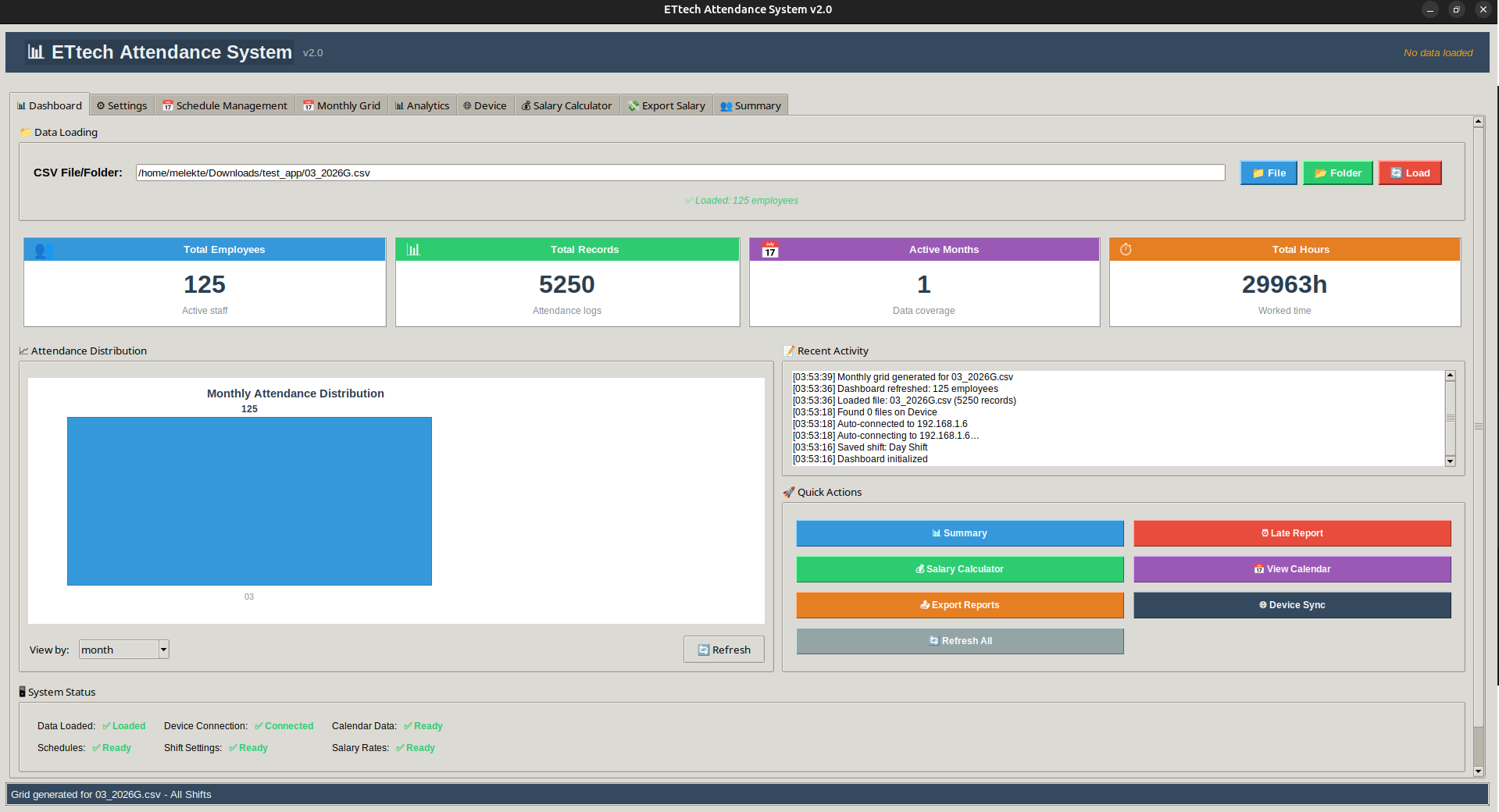
The central hub. Load attendance data from a single CSV or a full folder of monthly files. See stats, charts, a live activity log, and quick action buttons — all in one screen.

Quick stats: employees, records, active months, total hours
Charts by month, day of month, or top employees
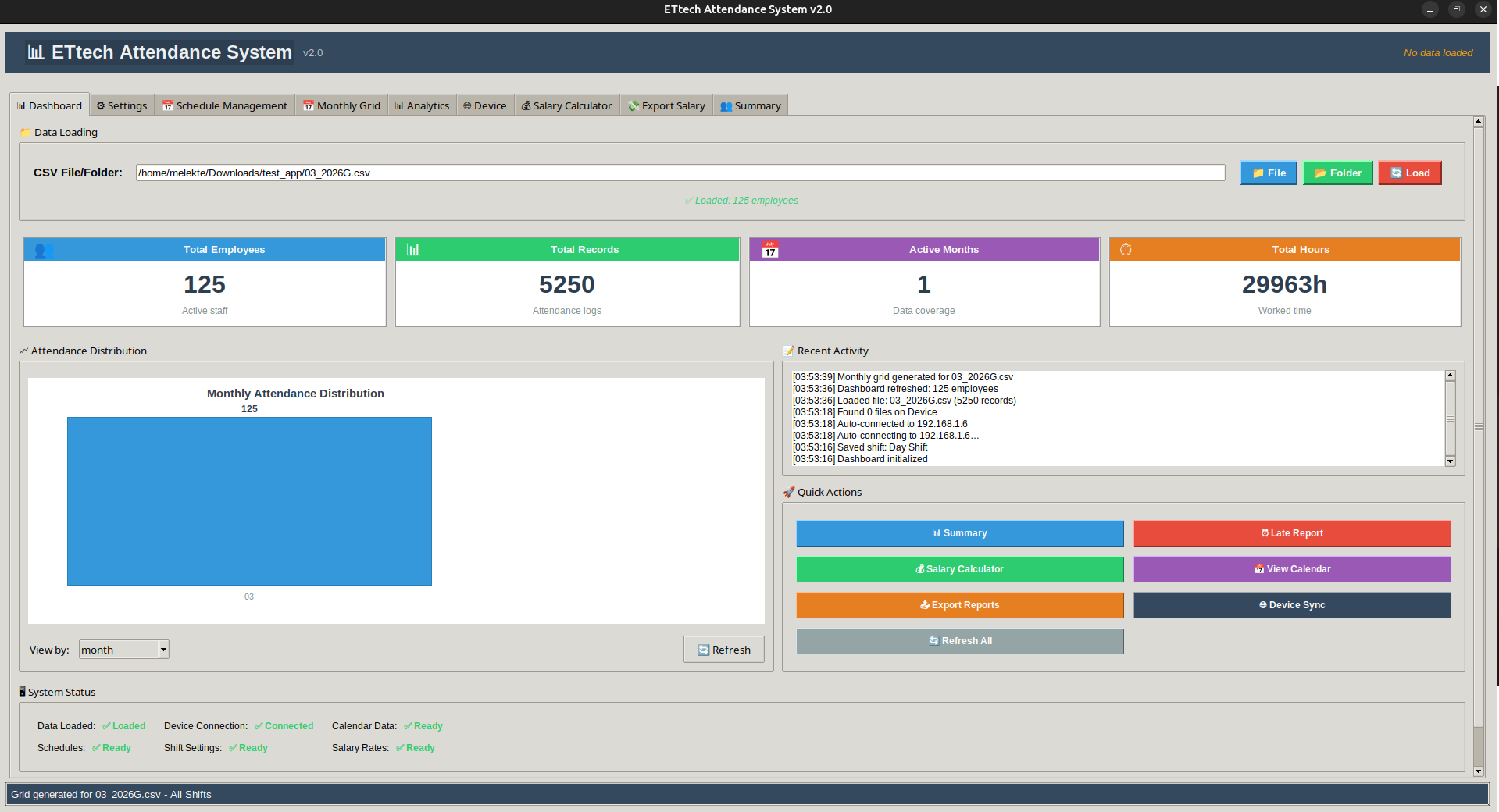
Recent activity log with timestamps
Quick actions: Summary, Reports, Salary, Calendar, Export, Sync
Real-time system status: data, device, calendar, schedules, shifts, salary
Load MM_YYYYG.csv (Gregorian) or MM_YYYYE.csv (Ethiopian)
Dashboard Stats
Dashboard – Stats & Chartsapp-dashboard-1.png
Dashboard – Stats & Charts
Dashboard Activity
Dashboard – Activity Logapp-dashboard-2.png
Dashboard – Activity Log
2 Settings & Shift Configuration

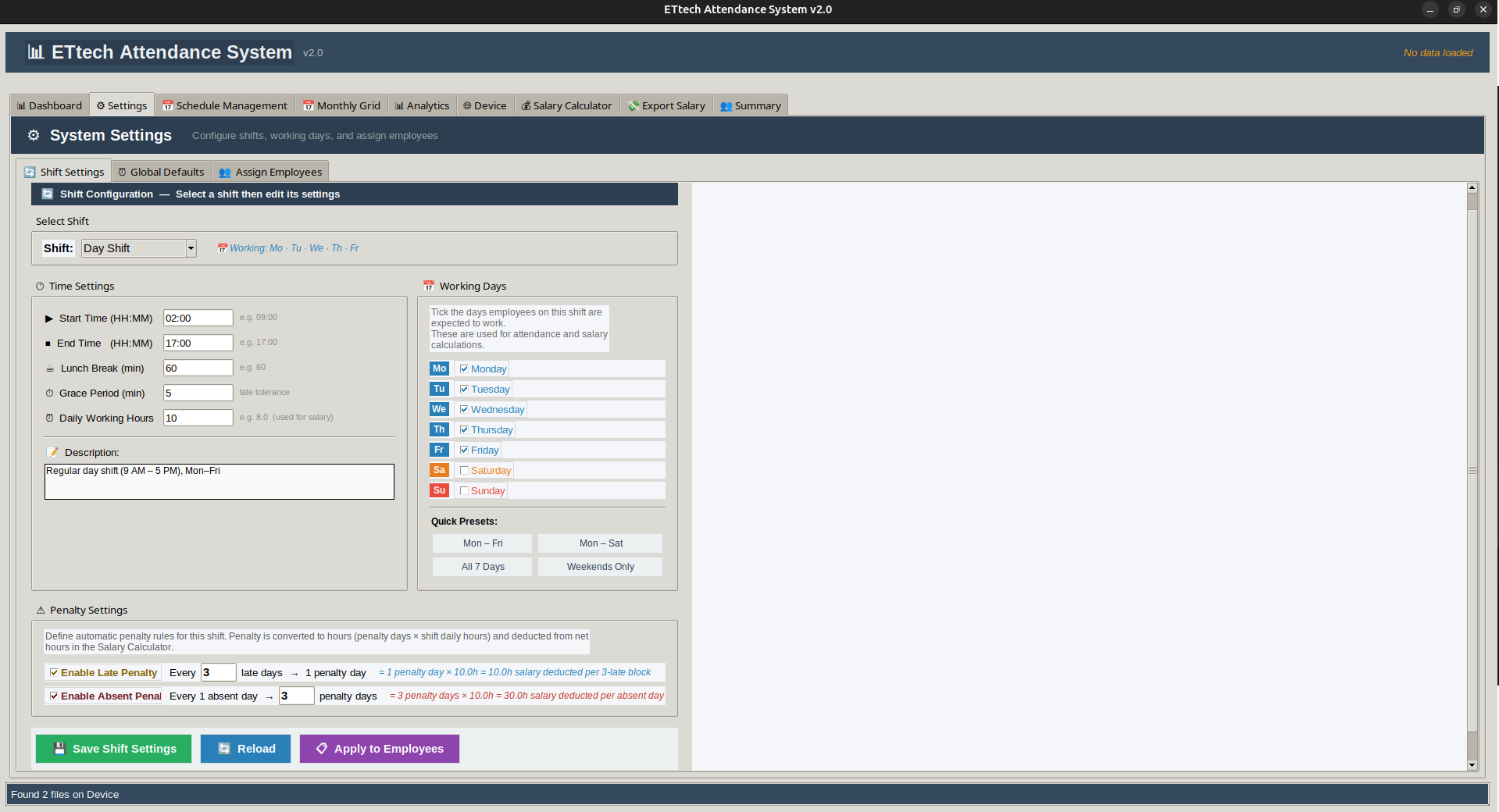
Configure up to 10 work shifts with full control over hours, grace periods, lunch breaks, and penalty rules. Assign employees to shifts individually or all at once.

10 shifts (Day, Shift 1–8, Night): start/end, lunch, grace, daily hours, working days
Late penalty: every N late days → 1 penalty day
Absent penalty: 1 absent day → M penalty days
Global defaults: start/end, lunch, daily hours, grace, max late/break
Assign single, multiple, or all employees to any shift
View and print shift assignment report
Shift Config
Shift Configurationapp-settings-1.png
Shift Configuration
Employee Assignment
Employee Shift Assignmentapp-settings-2.png
Employee Shift Assignment
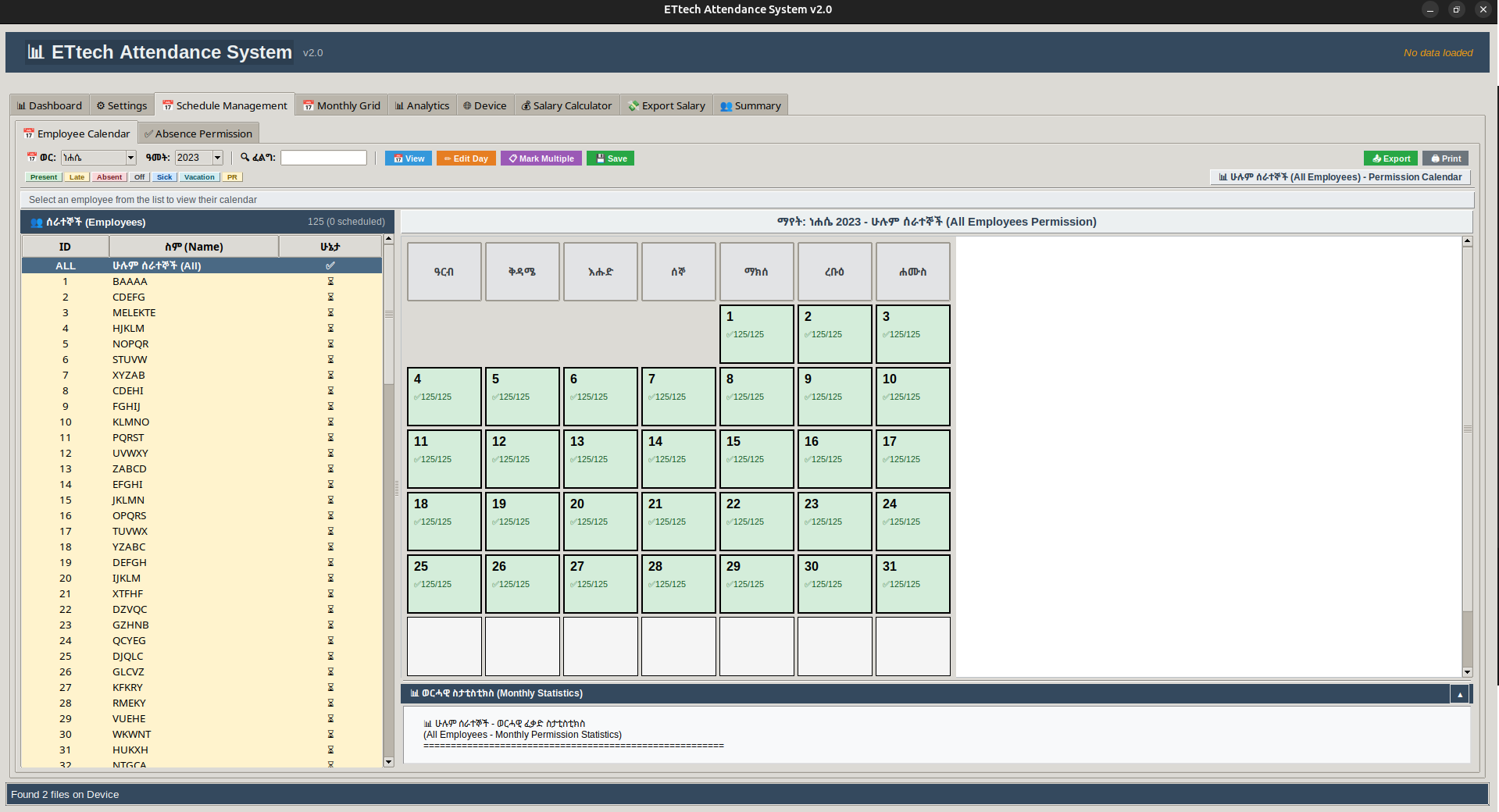
3 Schedule Management

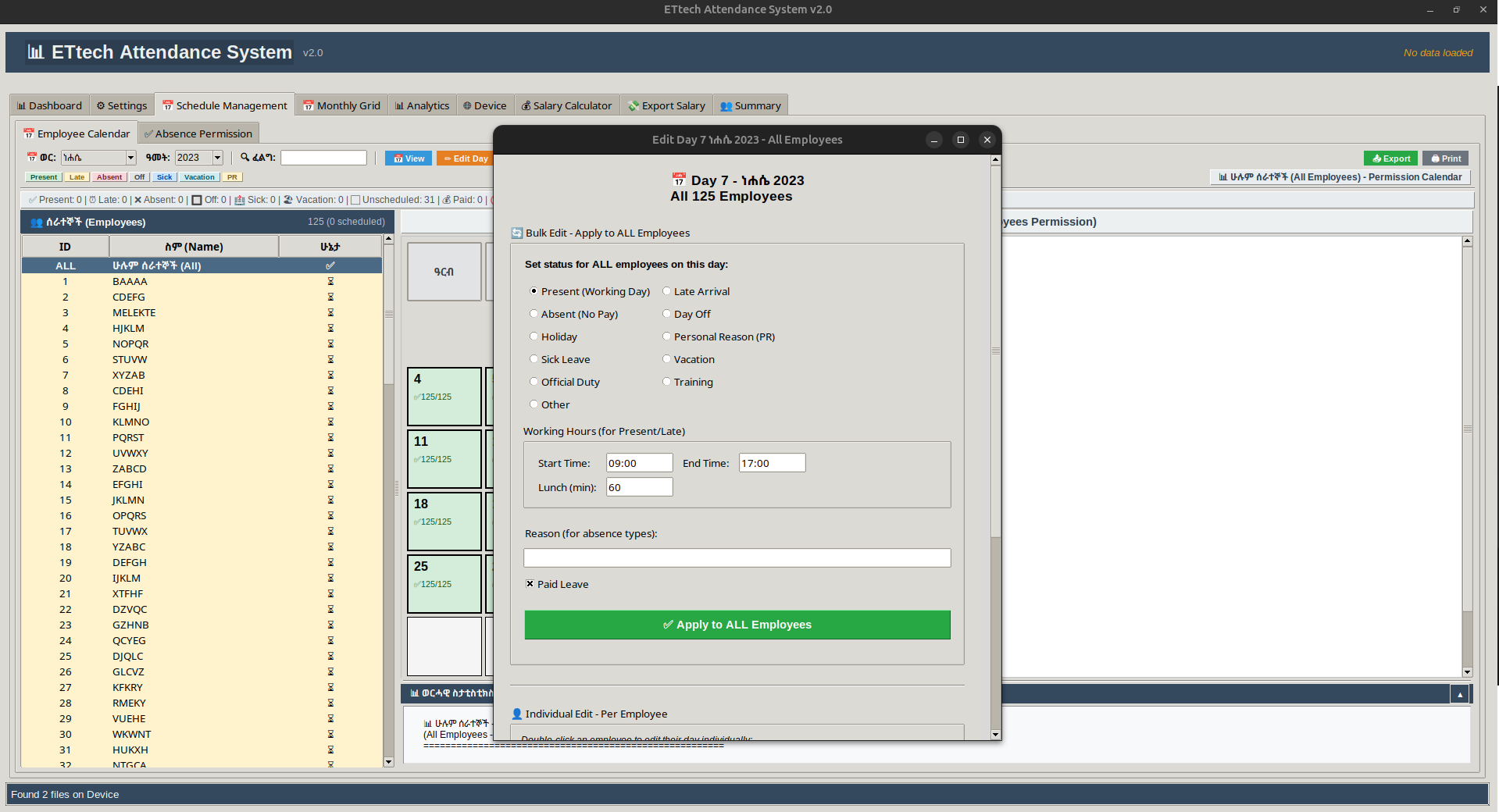
Full employee calendar with visual monthly grids. Edit individual days, bulk-mark date ranges, manage absence permissions with an approval workflow, and export or print schedule data.

Visual monthly grid: day status, clock-in/out, lunch, permission
Ethiopian and Gregorian month/year selection
Edit a single day: status, hours, reason, paid/unpaid
Bulk-mark multiple employees across a date range
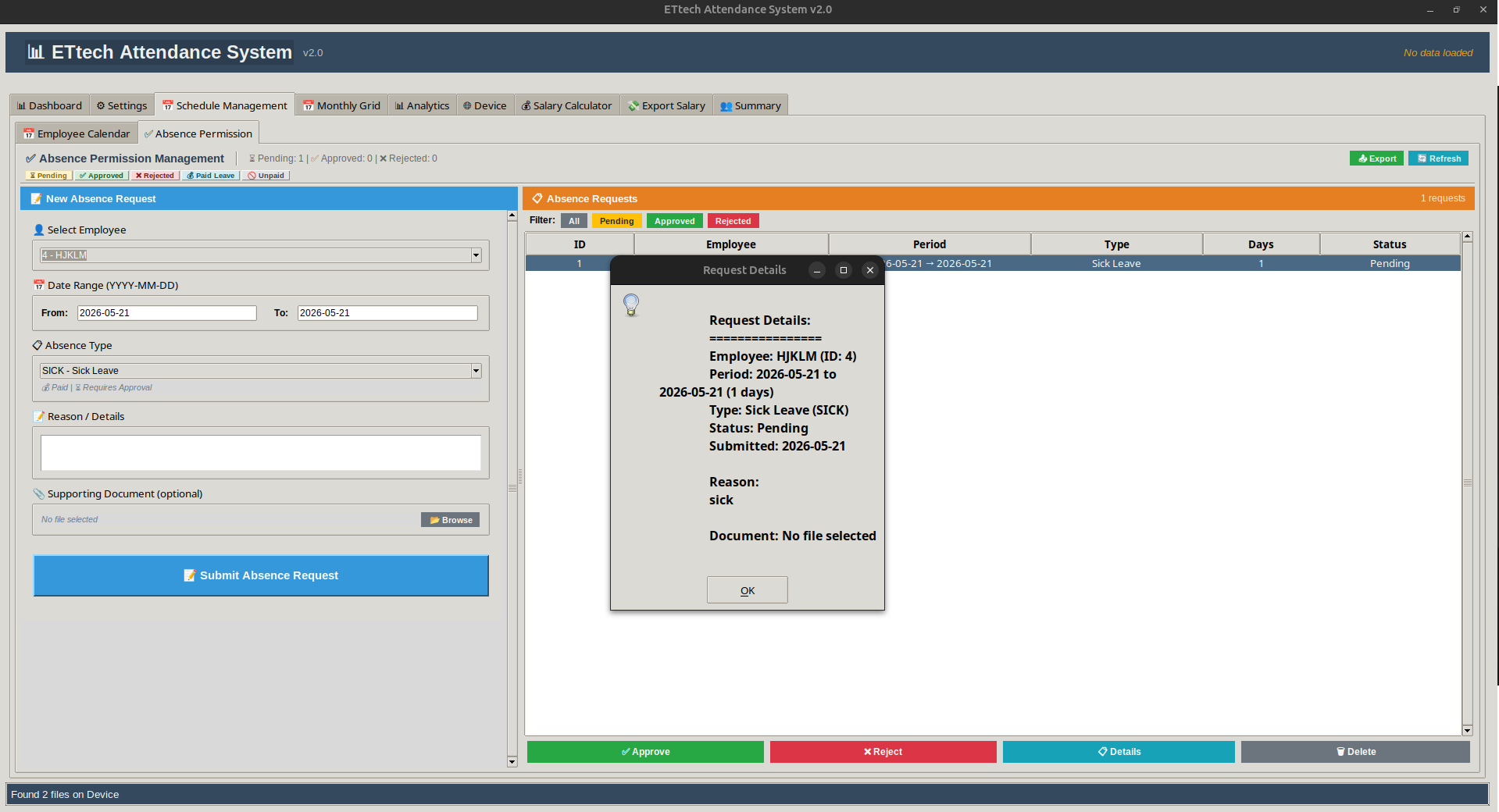
Absence permission: submit, auto-approve, approve/reject with audit trail
Monthly stats: paid/unpaid days, attendance rate, total hours; CSV export
Calendar Grid
Employee Calendar Gridapp-schedule-1.png
Employee Calendar Grid
Absence Permission
Absence Permission Systemapp-schedule-2.png
Absence Permission System
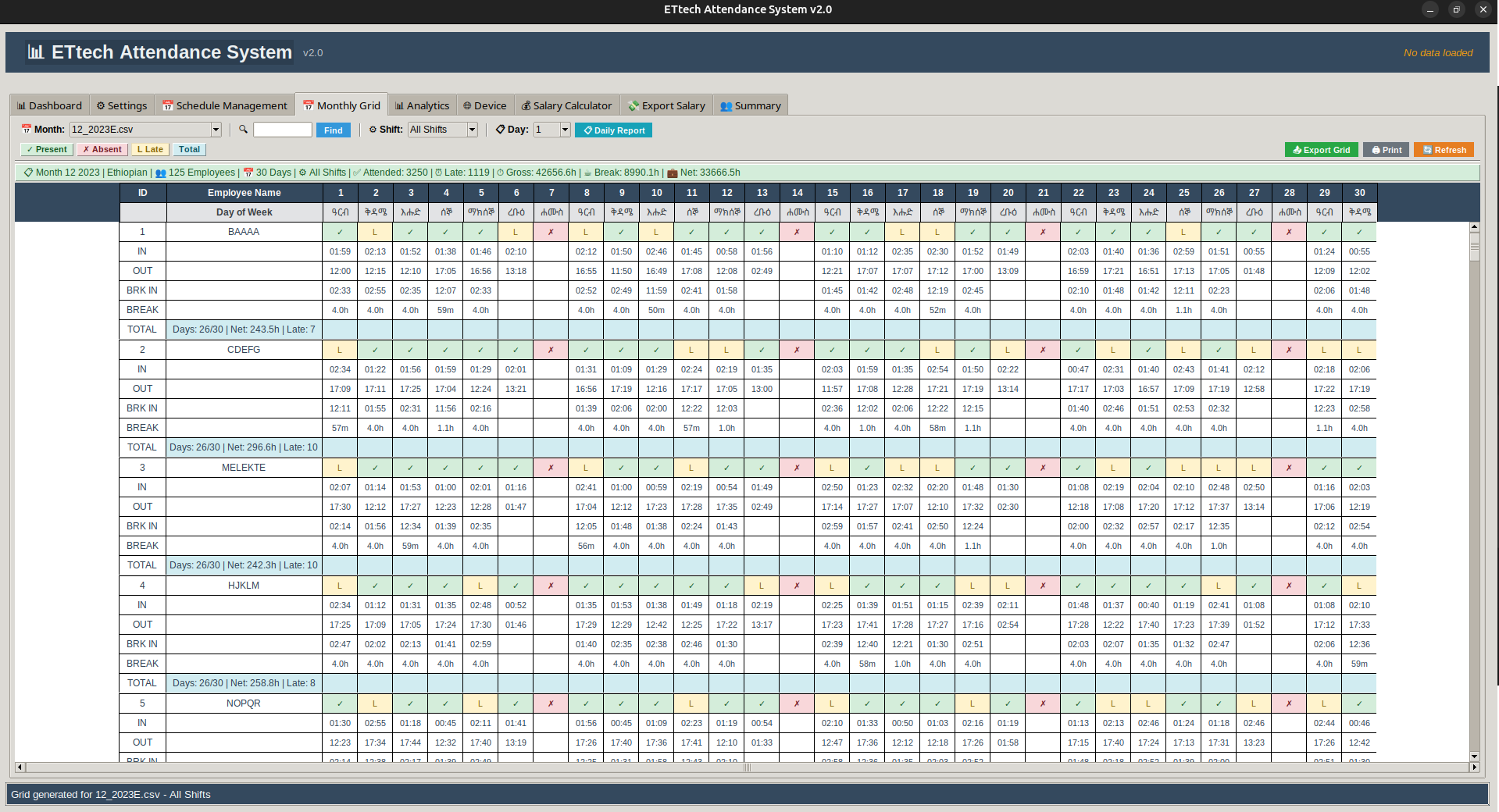
4 Monthly Grid

Matrix view — all employees vs all days of the selected month. See Present / Late / Absent at a glance, with clock-in/out, break-in/out, and per-employee monthly totals.

Matrix: employees × days with Present / Late / Absent icons
Clock-in, clock-out, break-in, break-out per day
Per-employee totals: days attended, late count, gross/break/net hours
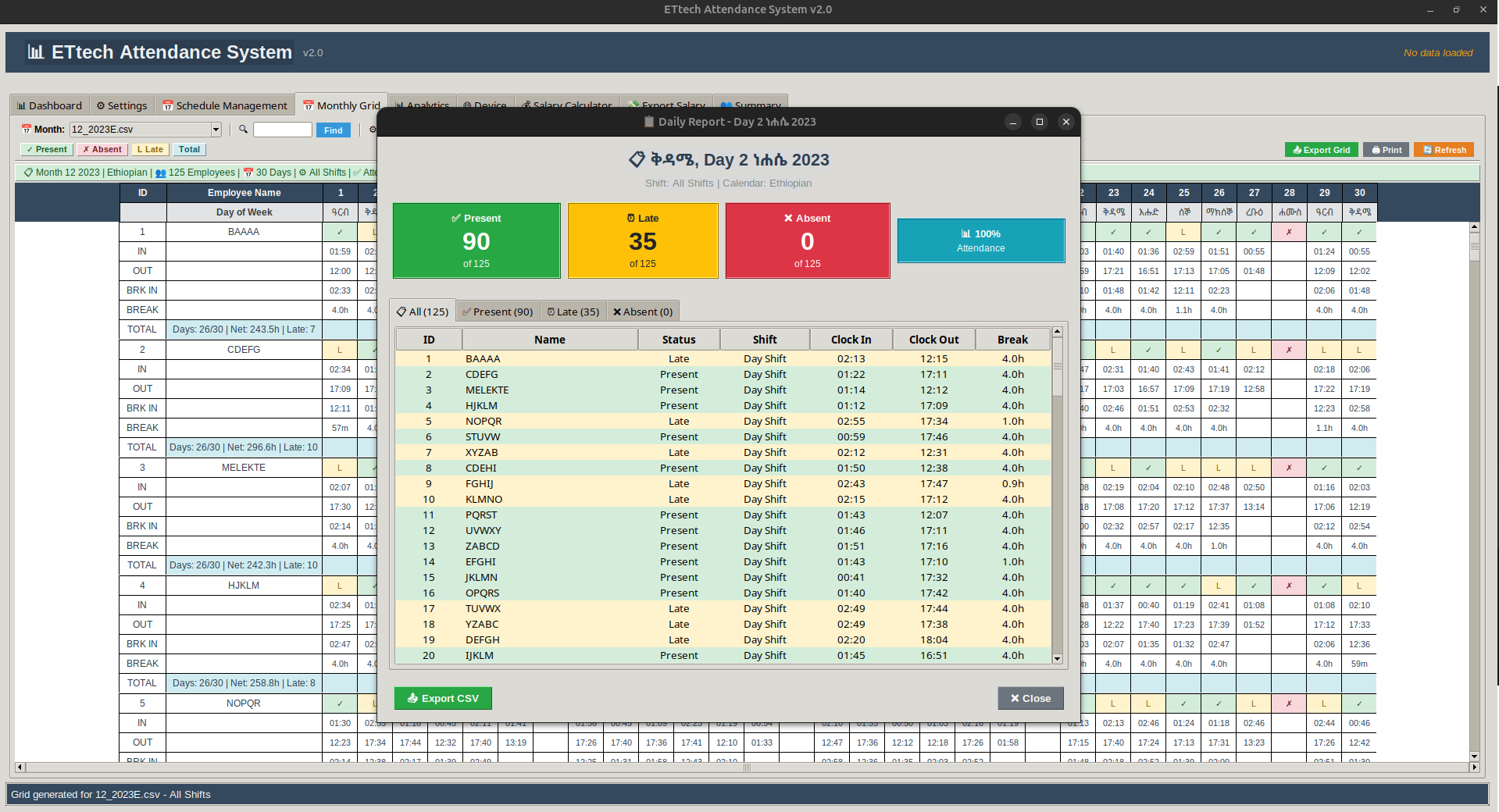
Daily report: present/late/absent list for any selected day
Filter by shift, search by employee ID
Export grid to CSV or print
Monthly Matrix
Monthly Attendance Matrixapp-grid-1.png
Monthly Attendance Matrix
Daily Report
Daily Report Viewapp-grid-2.png
Daily Report View
5 Analytics

Deep per-employee analytics with four interactive charts. Understand attendance patterns, working hour trends, and event distribution across all loaded months.

Employee panel: total records, active months, event counts, overall hours
Chart 1 – Days attended per month
Chart 2 – Event distribution pie: clock-in/out, break-in/out
Chart 3 – Monthly gross vs net hours
Chart 4 – Activity pattern by day of month
Searchable employee dropdown
Analytics Charts
Analytics – Charts Viewapp-analytics-1.png
Analytics – Charts View
Employee Details
Employee Details Panelapp-analytics-2.png
Employee Details Panel
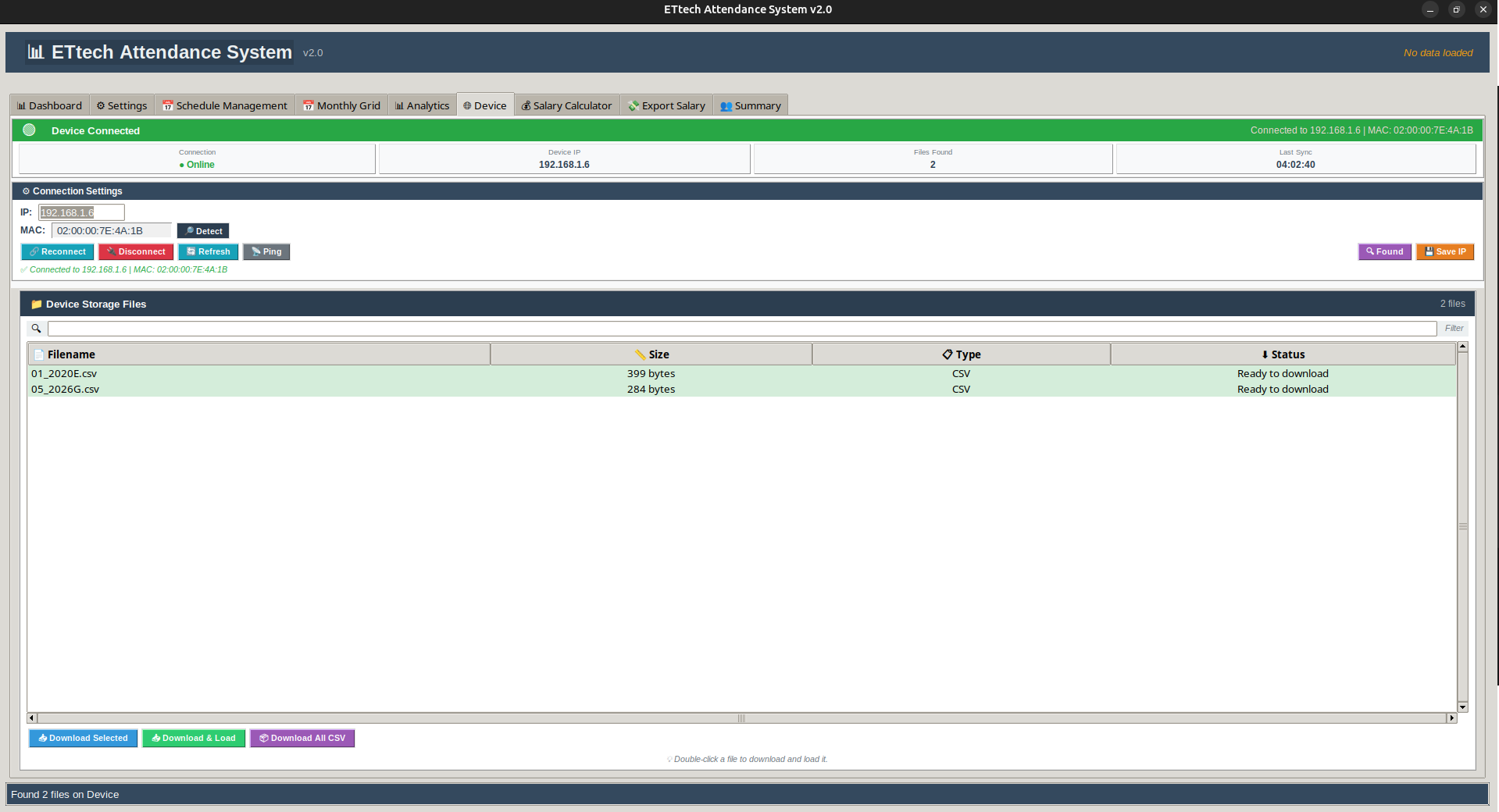
6 Device Sync

Connect directly to the ET-100 terminal over your local network. Browse and download attendance files — or let the application auto-locate the device by MAC address.

Connect via IP address — saved automatically for next startup
Detect and save device MAC address from ARP table
"Found" button — auto-locates device on the network by MAC
Ping test to verify device reachability before syncing
Browse device files (CSV/TXT) with name filter
Download selected, all CSVs, or double-click to load immediately
Device Connection
Device Connection Screenapp-device-1.png
Device Connection Screen
File Browser
File Browser & Downloadapp-device-2.png
File Browser & Download
7 Salary Calculator

Automatically calculates each employee's salary using machine-recorded attendance, scheduled days, absence permissions, and shift penalty rules. Generates a full breakdown and printable pay slip.

Period auto-detected from the loaded attendance file
Hourly or monthly rate — monthly auto-calculates working days per shift
Overtime toggle — when off, salary is capped at contracted hours
Combines machine days, schedule days, absent deductions, and penalties
Full breakdown: gross, break, net, penalty hours, and final salary
Print pay slip; export to text file; cached per employee per month
Salary Calculation
Salary Calculation Screenapp-salary-1.png
Salary Calculation Screen
Pay Slip
Pay Slip Print Previewapp-salary-2.png
Pay Slip Print Preview
8 Export Salary

Consolidated view of all calculated salaries for the current period. Export to CSV for finance teams or to PDF for formal records. Jump to any employee's calculator with a double-click.

All cached salary results for the current period in one table
Columns: ID, Name, Rate Type, Rate, Total Pay
Double-click any row → jump to that employee's Salary Calculator
Export full table to CSV for payroll teams
Export to PDF for formal documentation and record-keeping
Salary Table
Salary Export Tableapp-export-1.png
Salary Export Table
PDF Export
PDF Export Previewapp-export-2.png
PDF Export Preview
9 Summary

Colour-coded, sortable HR overview of every employee's attendance for any period — with absence severity highlighted and one-click drill-down into individual analytics.

Filter by all months or a specific monthly file
Columns: ID, Name, Total Days, Working Days, Days Attended, Absent, Late, Penalty, Paid Days
Days Attended = machine days + permissions – scheduled absent days
Colour-coded rows by absence severity for fast identification
All columns sortable with a single click
Double-click row → full Analytics for that employee; export to CSV
Summary Table
Summary – All Employeesapp-summary-1.png
Summary – All Employees
Colour-coded View
Colour-coded Absence Viewapp-summary-2.png
Colour-coded Absence View

Ready to get the ET-100?

We deliver, install, train your staff, and provide after-sale support. No hidden fees — just a clear quote.

1-Year Warranty Included
Professional Installation
Staff Training Included
Free After-Sale Support